Renaming ACF Fields When You Use Local JSON
With Local JSON the field definition lives in a versioned .json file while each environment's values remain in its database. Prepare and commit the replacement definition, but on each environment copy and verify the values under the new name while the old definition is still active, then deploy the new JSON and verify the cutover. Deploying the definition before the destination data exists is what produces the “all our fields are empty on production” report.
What Local JSON changes about a rename
Without Local JSON, the definition lives in the database and changes the moment you save the field group. With it, the definition is a file that travels through git and arrives on each environment at deploy time — while the data sits in each environment’s own database and does not travel at all. The two halves of a rename are now decoupled, and the order matters on every environment separately.
The order that works
Rename the field locally so ACF rewrites the JSON, review the diff, and commit the file without deploying it yet. On staging, copy and verify the values under the new name while the old definition remains active; then deploy the JSON and verify the new definition. Repeat that data-first cutover on production during a quiet window. A move-in-place UPDATE cannot keep both sides readable, so it requires a maintenance window and a coordinated deploy.
// acf-json/group_6a1c93f4a1b02.json
{
  "key": "group_6a1c93f4a1b02",
  "title": "Employee Details",
  "fields": [
    {
      "key": "field_6a1c93f4b2e07",
      "name": "contact_phone",   // changed
      "label": "Contact Phone",
      "type": "text"
    }
  ]
}
Change the name only. The key is the anchor that ties existing rows to this definition — edit it by hand and every saved value on every environment is orphaned at once, with no way to match them back automatically.
The three-environment sequence
Local: rename the field, confirm ACF rewrote the JSON file, and commit it as its own change. A rename mixed into a larger commit is one you cannot revert cleanly when production goes wrong at 5pm.
Staging: while the old JSON definition is active, copy and verify the destination metadata. Deploy the replacement JSON only after that gate passes, verify the active definition, then click through real content.
Production: repeat the same copy-first sequence in a quiet window with a restore point. Deploy the already-reviewed JSON only when the production destination rows have verified.
Confirming the definition is live
After deploying, confirm the field returned by ACF has the expected name and unchanged key. ACF loads definitions from registered Local JSON paths during initialization; the database copy is still used by the field-group editor and may need synchronization.
"Sync available" means the JSON item is missing from the database or its modified value is newer than the database copy. It is a prompt to update that database mirror, not proof that front-end field loading ignored the JSON file.
If both a database group and a JSON group define the same key, resolve that first. Two registered load paths containing the same group key produce the same ambiguity.
Multiple load paths
ACF saves to one directory and loads from many. If a plugin or a parent theme registers its own load path, more than one file can define the same group, and which one wins depends on registration order rather than anything you can see in the admin.
add_filter('acf/settings/save_json', function ($path) {
    return get_stylesheet_directory() . '/acf-json';
});

add_filter('acf/settings/load_json', function ($paths) {
    unset($paths[0]);
    $paths[] = get_stylesheet_directory() . '/acf-json';
    return $paths;
});
Before renaming anything, grep every registered load path for the group key and confirm exactly one file defines it. Two matches is not an edge case on an inherited site — it is the normal state of a theme that was forked from another one.
When two people rename fields in the same group
ACF rewrites the whole group file on every save, so two branches that each change one field produce a conflict across the entire JSON document rather than the two lines that actually differ. Resolving it by taking one side wholesale silently drops the other person's field.
The practical fix is procedural: merge field-group changes before anyone deploys, and treat the JSON file as generated output rather than something to hand-edit during a merge. If you do end up resolving by hand, diff the resulting file's field keys against both branches before committing.
Migrating the data per environment
Each environment needs its own migration because each has its own postmeta table. Staging first: prepare destination rows, verify them, deploy the definition, and click through content. Production second, in a low-traffic window, with a restore point and the same gates.
SELECT meta_key, COUNT(*) FROM wp_postmeta
 WHERE meta_key IN ('employee_phone','contact_phone')
 GROUP BY meta_key;
How Field Renamer handles it
It detects that the group loads from Local JSON and switches to a guided sequence rather than editing source files. It snapshots, copies, and verifies the destination metadata while the old definition remains active, generates the replacement JSON, and pauses for you to deploy it. After deployment it verifies that the new definition is live, unique, and still tied to the same field key before completing. It never writes to theme or plugin files.
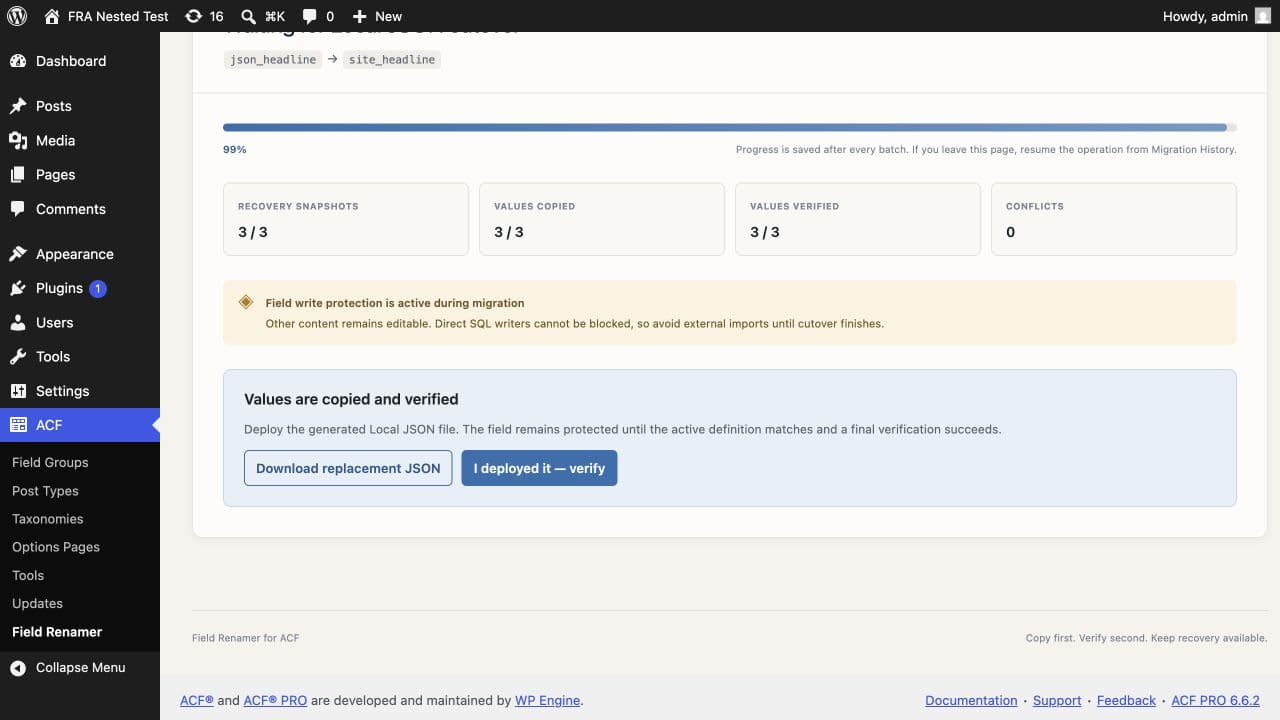
Getting this order wrong on production is the failure people write support tickets about. Field Renamer holds the field during cutover, then verifies that the deployed definition is live, unambiguous, and still matches the field key it started with. The guided Local JSON workflow →
Rolling back
Rollback is also two halves. Revert the JSON file through git and deploy it, then reverse the data migration on that environment. Keep the original rows in place until both environments are confirmed — they are what makes the reversal possible at all.
Common questions
Do I rename the field in ACF or edit the JSON file?+
Rename it in the ACF UI and let ACF rewrite the file. Hand-editing works but is easy to get subtly wrong, and the file is regenerated wholesale on the next save anyway.
Should I deploy the definition or migrate the data first?+
Migrate the data first on each environment, or use a tool that holds the cutover until both are confirmed. Deploying the definition ahead of the data is what makes every field look empty.
Why does my field group say "Sync available"?+
The JSON item is missing from the database or has a newer modified value. Sync updates the database mirror used by the admin editor; separately verify the active field name and key after deployment.
Does the data migrate with the JSON file?+
No. The JSON file contains the field definition only. Values live in each environment's own postmeta table and never travel with a deploy.
What if two branches both changed the same field group?+
ACF rewrites the whole file on save, so you get a conflict across the entire document. Merge field-group changes before deploying, and diff the field keys against both branches if you resolve by hand.