How to Rename an ACF Field Without Losing Data
Renaming an ACF field only changes the field definition. The values stay in wp_postmeta under the old meta_key, so the field reads as empty even though nothing was deleted. To keep the data available, migrate both the value row and its underscore-prefixed reference row, verify the result, then switch the definition. A direct UPDATE moves those rows and relies on your database backup for recovery; Field Renamer instead copies and verifies them while retaining the originals for rollback.
What actually happens when you rename
ACF writes two rows per field per record. One holds your value under the field name. The other holds the field key under the same name prefixed with an underscore, so ACF can find the definition that produced the value.
meta_key            meta_value
-----------------------------------------------
employee_phone      +44 7700 900 812
_employee_phone     field_6a1c93f4b2e07
Change the name in the field group editor and ACF starts asking for contact_phone. Nothing ever wrote that key, so get_field() returns null on every record. Both original rows are still sitting there, untouched — the content is filed under a name nothing is looking for any more.
The safe order of operations
Back up the database. Check that no destination rows already exist. Migrate both members of each ACF pair, verify the preflight and destination counts, and only then change the field definition. If your method moves rows with UPDATE, the backup is your recovery path. A copy-first workflow can retain the originals until you have verified real content.
Never switch the definition first and migrate afterwards on a live site. In the gap, every template call returns null, and any post someone saves writes an empty value under the new key — which then collides with the data you were about to copy across.
Option 1 — two UPDATE queries
If the old name is unique across the site and the field is top-level, two statements can move it. These statements rename the existing rows; they do not copy them or preserve the old keys. Run them against a database copy first, take a restorable backup, and check your table prefix — wp_ is a default, not a guarantee.
UPDATE wp_postmeta
   SET meta_key = 'contact_phone'
 WHERE meta_key = 'employee_phone';

UPDATE wp_postmeta
   SET meta_key = '_contact_phone'
 WHERE meta_key = '_employee_phone';
Use = and not LIKE. A LIKE match on employee_phone also catches employee_phone_alt, employee_phone_2, and repeater keys containing the string. Because UPDATE removes the old keys, recovery means restoring the backup or carefully reversing the statements before anything writes to either name.
- Full database backup
- Locate the correct metadata rows
- Write and run both UPDATE queries
- Verify the counts by hand
- Find and fix whatever you missed
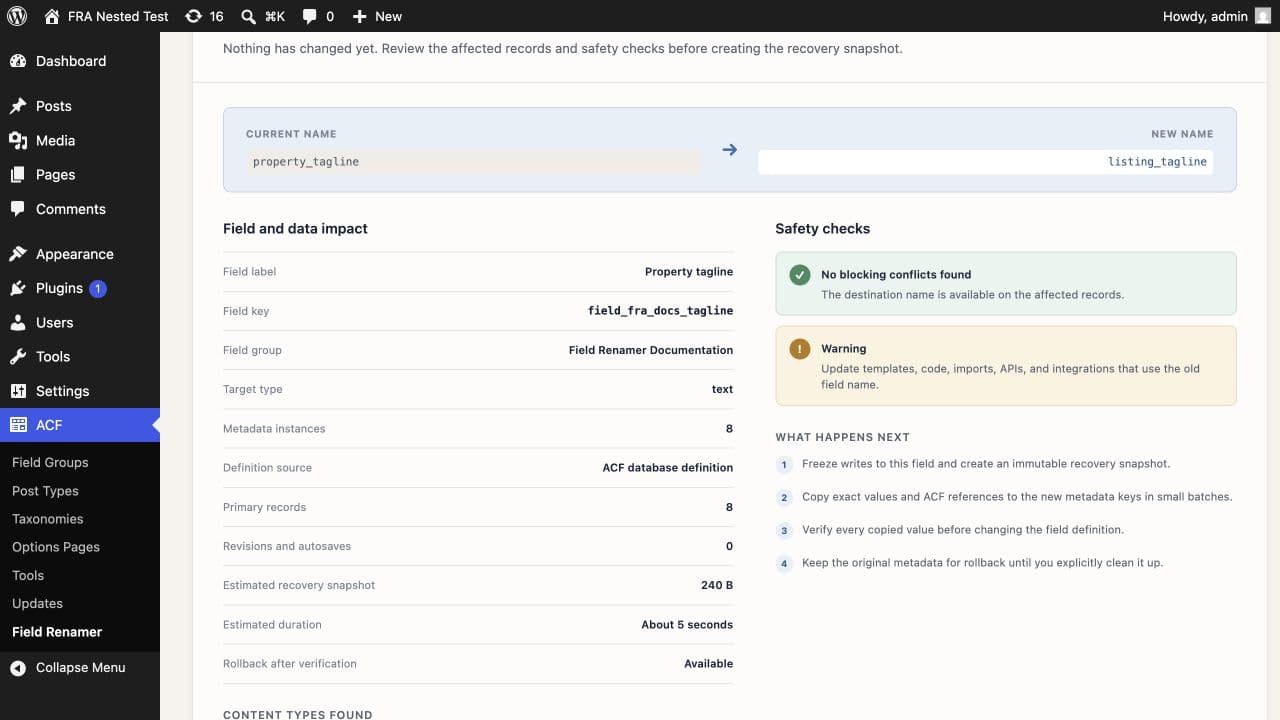
- Impact preview with record counts
- Conflict detection before any write
- Batched copy, every value read back
- Originals retained until you delete them
- Verified rollback
Revisions and autosaves
Both statements above already catch revisions, because revisions store their own postmeta rows against their own post IDs. That is usually what you want. It is worth knowing it happened, though: if you later restore a revision that predates the rename, ACF reads the restored rows under whichever name they were saved with, and a field that looked fine can go empty again on one specific post.
If you want to see the split before you commit, group the count by post type rather than taking a single total.
SELECT p.post_type, COUNT(*)
  FROM wp_postmeta m
  JOIN wp_posts p ON p.ID = m.post_id
 WHERE m.meta_key = 'employee_phone'
 GROUP BY p.post_type;
Multisite
Every subsite has its own postmeta table — wp_2_postmeta, wp_3_postmeta and so on — and a field group registered network-wide still stores its values separately per site. There is no single query that renames the field everywhere. You run the migration once per subsite, and you verify once per subsite.
This is also where hardcoded prefixes bite hardest. A statement written against wp_postmeta silently does nothing on subsite 4, and the field looks empty there long after you have signed the work off.
Two UPDATE queries have no built-in preview, conflict check, or retained-row rollback. That is the failure mode the impact review exists to catch. See what the impact review shows →
Option 2 — WP-CLI
Same two statements, better ergonomics: the site prefix is resolved for you, multisite is addressable, and you can pipe a count first.
wp db query "SELECT meta_key, COUNT(*) FROM $(wp db prefix)postmeta \
  WHERE meta_key IN ('employee_phone','_employee_phone','contact_phone','_contact_phone') \
  GROUP BY meta_key;"

wp db query "UPDATE $(wp db prefix)postmeta \
  SET meta_key = 'contact_phone' WHERE meta_key = 'employee_phone'; \
  UPDATE $(wp db prefix)postmeta \
  SET meta_key = '_contact_phone' WHERE meta_key = '_employee_phone';"
On multisite add --url=sub.example.com and repeat per site. To sweep every subsite in one pass, wrap it in wp site list --field=url and loop — but run the SELECT form of the loop first and read the output before you let the UPDATE form anywhere near it.
Option 3 — a plugin that verifies
At some point the honest question is whether this is worth an hour of your time and a restore point. If the field is populated, sitting on a client site, or a rename you would struggle to explain to whoever owns the content, buy the tool. The first year is $49, and it will not run a migration it cannot verify.
The queries are the easy part. You can write SELECT queries to count rows and inspect post types, but you must design those checks yourself, prove ACF ownership, detect destination conflicts, and search external references separately. Field Renamer matches on the stable field key, copies the values in batches, reads every one back, and only then switches the definition — with the originals retained and rollback available.
Verifying the rename
Whichever route you took, prove it. For a move-in-place UPDATE, compare the new counts with the preflight counts and confirm the old keys are now absent. For a copy-first workflow, confirm old and new counts match until you deliberately clean up the retained originals.
SELECT meta_key, COUNT(*)
  FROM wp_postmeta
 WHERE meta_key IN ('employee_phone','contact_phone')
 GROUP BY meta_key;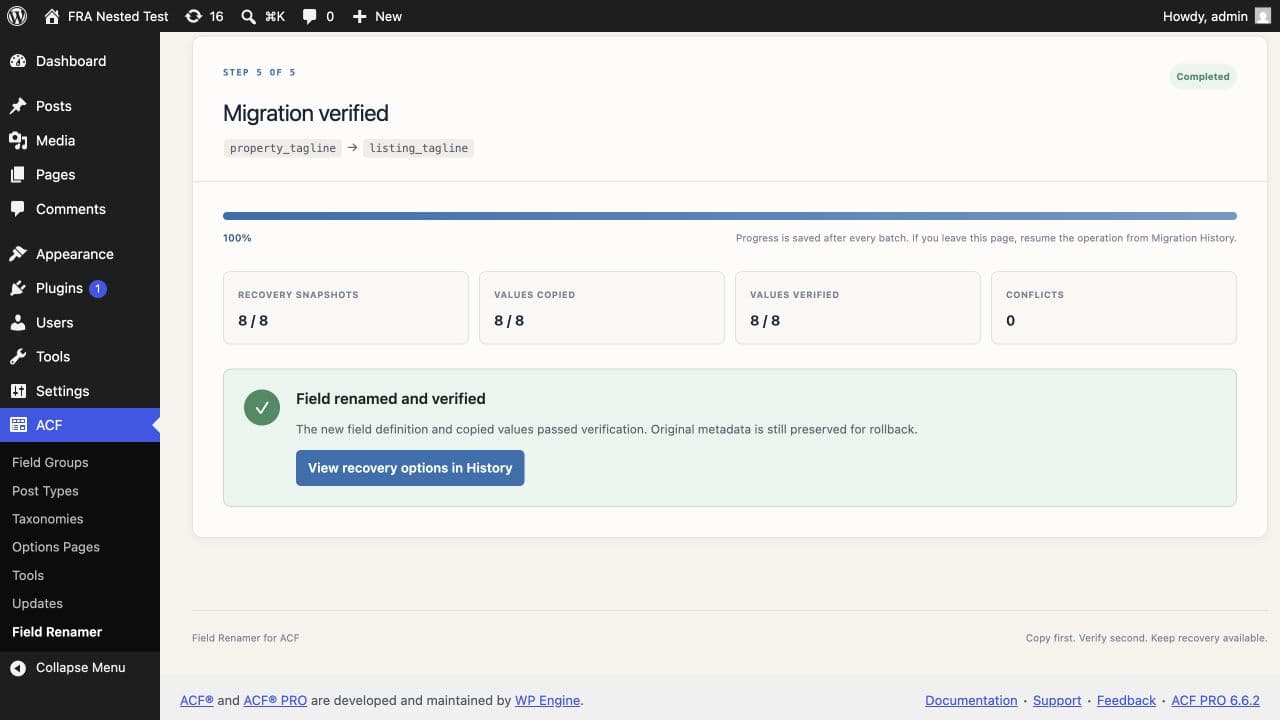
If the site uses a persistent object cache, flush it after the cutover so your verification is not reading a cached pre-rename value.
What to update after the cutover
The database is only half of it. The old name is a string, and strings live in more places than the theme:
Template calls to get_field() and the_field(). Saved WP_Query and meta_query arguments. REST API consumers and headless front ends reading the meta key directly. CSV or WP All Import mappings. Reporting and export tools. Search and filter plugins with indexed meta keys. Anything caching a rendered value under the old name. ACF conditional logic normally references the stable field key, so confirm it still behaves correctly but do not rewrite those keys.
Nothing here is automatic, and no tool should rewrite your source for you. Field Renamer runs a bounded, read-only advisory scan across active theme and plugin directories and reports the first match per file so you know where to look — it never edits code.
If it half-worked
The most common partial failure is running the first statement and forgetting the second. The values move to the new name, but the underscore reference row remains under the old name. The value/reference pair is now inconsistent, so ACF cannot reliably associate the stored value with its field definition.
Check for it directly. If the two counts differ, the reference rows are the ones lagging.
SELECT meta_key, COUNT(*)
  FROM wp_postmeta
 WHERE meta_key IN ('contact_phone','_contact_phone')
 GROUP BY meta_key;
If something looks wrong
Rename the field back to the old name in the ACF editor first. That alone restores visibility if the data was never moved, and it costs nothing. Reach for the backup only once you have confirmed the old rows are genuinely gone.
You can do all of this by hand, and on your own site with a fresh backup it is entirely reasonable. On a populated client site, the preview is the part worth paying for. See what the impact review shows →
Common questions
Will renaming an ACF field delete my data?+
No. Renaming changes the field definition only. Every value stays in wp_postmeta under the old meta_key. The field reads as empty because ACF is now looking for a key that nothing has ever written to.
Do I need to update the underscore row as well?+
Yes. ACF writes a pair of rows per field per record: the value under the field name, and the field key under the same name prefixed with an underscore. Move only the first and ACF cannot resolve the definition behind the value.
Does this two-query method work for Repeater subfields?+
No. Repeater and Flexible Content subfields use composite keys containing a row index. Field Renamer 0.2.0 handles them with anchored path matching, child field-key ownership checks, and one snapshot per row instance.
What about revisions and autosaves?+
An exact-match UPDATE on meta_key catches them automatically, because revisions store their own postmeta rows. Group your count by post type first if you want to see the split before committing.
Is it safe to run this on a live site?+
Only with a restore point and a quiet window. Direct SQL bypasses WordPress and ACF write hooks, so anything writing metadata during the migration — an import, a cron job, an external integration — can land in the gap between the copy and the cutover.
How long does it take by hand?+
Allow time to take and test a backup, inspect the affected rows, run both statements, verify the counts, and click through real content. Multisite repeats that work for every subsite.